


We are excited you have chosen Mississippi State University, and we look forward to seeing you on your first day. Before then, there are some important onboarding tasks for you to review and complete to ensure you will be ready for your first day of work.
New Faculty and Staff Members
Before your first day
These forms should be completed and provided to the hiring coordinator in the department you were hired.
- Information about Form I-9 (processed in the electronic hiring system)
- Complete your W-4 Employee's Withholding Allowance Certificate Tax Withholding Estimator
- Mississippi Employee's Withholding Allowance Certificate
- *Parking Permit (processed electronically through this link)
*An employee may request a Parking Permit within 30 days of their hire date, as long as the employment has been officially processed in the University's system (BANNER).
Your first day
- Get your MSU ID
- Setup Your NetID Password and Two Factor Authentication (you must obtain your 9-digit MSU ID number from your hiring department prior to setting up your NetID password and Two Factor Authentication)
- How to Access Outlook Email
- Direct Deposit
- How to Opt-In to Receive an Electronic W-2 and 1095-C
- MSU's Wireless Network
- MSU's Voice Mail Setup
- myState Update your personal email address and mobile telephone number (supports PERS and benefits-related communications.) 1.) Under Apps & Services, select Banner. 2.) Under Personal Information, select Update your Directory & Address Information. 3.) Update the information in the State Retirement Contact Information section.
Required MSU Compliance Training
-
MSU Active Attacker Training – Providing key information on responding in the event of an active attack on campus
-
MSU Policy Acknowledgement – Links to key university policies all employees should familiarize themselves with. All MSU employees, regardless of full time, part time, benefits status, etc. Excludes graduate students and student workers.
-
MSU Information Security Training
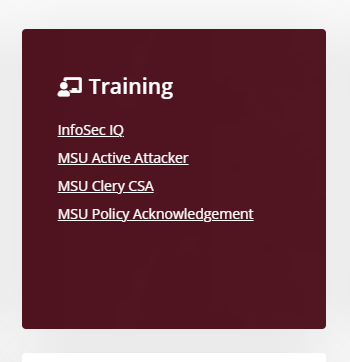
In addition to these courses, some employees also are assigned to complete MSU Clery Act Campus Security Authority Training, which provides information on required reporting of crimes on campus. You will find your assigned courses at the link: https://my.msstate.edu/ Click on the links in your training card under "My Resources." The card will look like this:
For technical issues, please contact the MSU ITS Service Help Desk at (662)325-0631 or servicedesk@msstate.edu
Understanding Your Benefits and Time Off
- 2026 MSU Benefits Guide
- Benefits Enrollment - Within 31 days, you must enroll in mandatory and optional health, insurance benefits, and flexible spending accounts, and within 30 days choose a retirement plan (if applicable).
- MSU's Personal and Major Medical Leave and Leave of Absence
- Employee and Dependent Tuition Remission